Showing posts with label iPhone. Show all posts

Wednesday, November 25, 2009

Firewall iP v1.1-2 Cracked

Firewall iP v1.1-2 download
http://www.zshare.net/download/68956170edaa0e1f/

Requirement:
mobilesubstrate
firmware 3.0 or above
jailbreak iPhone/iPod Touch

Installation Method
(1) Put it in /var/root/Media/Cydia/AutoInstall/
(2) Restart your device

Description:
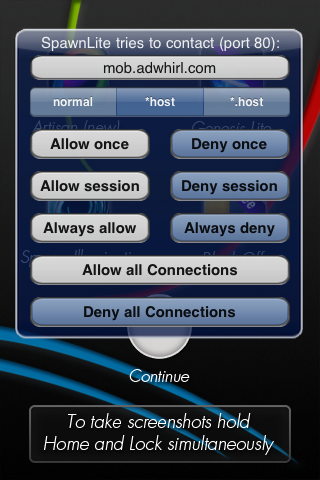
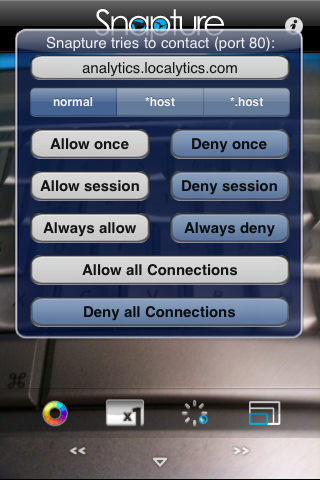
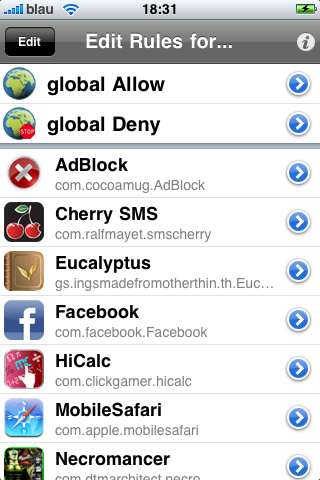
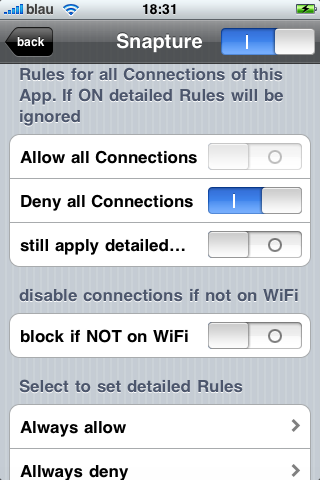
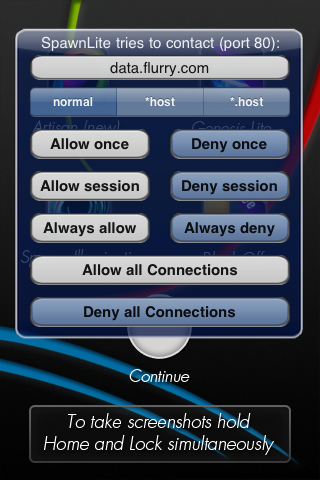
Decide yourself, Securtity for your iPhone and iPod touch Ony for iPhone OS 3.x Firewall iP allows you to block outgoing connections (TCP & UDP). It hooks into applications from AppStore and Cydia. Firewall iP will warn you if the app wants to establish a connection to a host and shows you the hostname. Then you have the options to allow/deny the connection once/always or allow/deny all connections for the application.

Screenshots:


Tuesday, November 24, 2009

How to fake or change iPhone Firmware Version


#backup SystemVersion.plist
cp -p /System/Library/CoreServices/SystemVersion.plist /System/Library/CoreServices/SystemVersion.plist.bak

#change product build version
plutil -key ProductBuildVersion -value 7C144 /System/Library/CoreServices/SystemVersion.plist
#Writing new value for ProductBuildVersion to /System/Library/CoreServices/SystemVersion.plist

#change product version number
plutil -key ProductVersion -value 3.1 /System/Library/CoreServices/SystemVersion.plist
#Writing new value for ProductVersion to /System/Library/CoreServices/SystemVersion.plist

#check firmware version number after change
plutil /System/Library/CoreServices/SystemVersion.plist


Firmware and Build Version
3.0 (7A341)
3.0.1 (7A400)
3.1 (7C144)
3.1.2 (7D11)
3.1.3 (7E18)
plutil -key ProductBuildVersion -value 7E18 /System/Library/CoreServices/SystemVersion.plist
plutil -key ProductVersion -value 3.1.3 /System/Library/CoreServices/SystemVersion.plist
.
.
.

Saturday, November 21, 2009

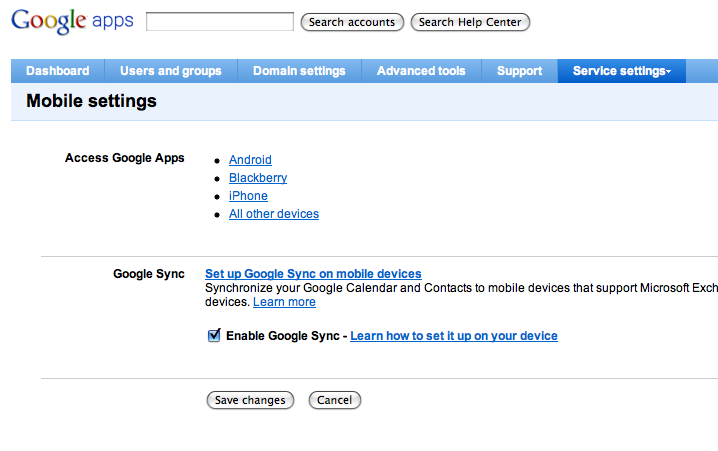
Google Apps and Google Sync to iPhone

If you have google apps email (that is your own domain, you have to enable mobile sync in your google app dashboard


and follow this guide to enable google sync

http://www.knowliz.com/2009/02/how-to-sync-multiple-calendars-with.html


Sunday, July 19, 2009

Fix SSH timeout for jailbreak iPhone

Login iPhone and edit /etc/ssh/sshd_config and change the line

from

#ClientAliveInterval 0

to

ClientAliveInterval 60

According to man sshd_config, this line,

Sets a timeout interval in seconds after which if no data has been received from the client, sshd(8) will send a message through the encrypted channel to request a response from the client. The default is 0, indicating that these messages will not be sent to the client. This option applies to protocol version 2 only.

Don’t forget to restart sshd on the iPhone after you save the file.

Saturday, May 2, 2009

Tuesday, February 10, 2009

How to decrypt iPhone IPA file

Decrypted IPA
Please take note that you don't need this method to decrypt the IPA file, if you already have the decrypted one downloaded from the net. This method applies to the app that you have directly purchased from App Store and want to decrypt it in order to be useful for others.

One of the decrypt methods is to use a jailbreak iPhone and run the script (source from pr0x.org Forum) below in iPhone to create the decrypted ipa.

To use this method you must have installed the app from App Store in jailbreak iPhone plus the following packages from Cydia
com.ericasadun.utilities gdb gawk zip ldid odcctools

Use the following commands in iPhone to install, if you don't like to use Cydia.
apt-get install com.ericasadun.utilities gdb gawk zip ldid odcctools

To find out the app names that your iPhone have installed, run this command in iPhone
find /var/mobile/Applications/ -iname *.app

and use this command to generated the decrypted ipa e.g.
./DCrypt.sh "Monkey Ball"


DCrypt.sh Select all

#!/bin/sh
#
# DeCrypt - v1.1 (2008-10-21)
# - v1.1 (2008-10-21)
# FloydianSlip
#
# Heavily based on xcrack
#
# Many thanks to:
# puy0, SaladFork, Flox, Flawless
#

echo "DeCrypt 1.1 (2008-10-21)"
echo "FloydianSlip"
echo

if [ ! -e /usr/bin/plutil ]; then
echo "Cannot find plutil (apt-get install com.ericasadun.utilities)"
exit 1
fi

if [ ! -e /usr/bin/gdb ]; then
echo "Cannot find gdb (apt-get install gdb)"
exit 1
fi

if [ ! -e /usr/bin/otool ]; then
echo "Cannot find otool (apt-get install odcctools)"
exit 1
fi

if [ ! -e /usr/bin/ldid ]; then
echo "Cannot find otool (apt-get install ldid)"
exit 1
fi


if [ ! -e /usr/bin/awk ]; then
echo "Cannot find awk (apt-get install gawk)"
exit 1
fi

if [ ! -e /usr/bin/zip ]; then
echo "Cannot find zip (apt-get install zip)"
exit 1
fi

if [ $# -ne 1 ]; then
echo "Usage: $(basename $0) <ApplicationName>"
echo
exit 1
fi

AppInput=$1

if [ -d "$AppInput" ]; then
tempLoc=$AppInput
else
echo "Locating $AppInput"
tempLoc=$(find /var/mobile/Applications -iname "$AppInput.app")
if [ -z "$tempLoc" ]; then
echo "Unable to locate $AppInput"
exit 1
fi
AppCount=$(find /var/mobile/Applications -iname "$AppInput.app" | wc -l)
if [ $AppCount -gt 1 ]; then
echo "Found two installation directories:"
find /var/mobile/Applications -iname "$AppInput.app"
exit 1
fi
fi

AppPath=$(dirname "$tempLoc")
AppName=$(basename "$tempLoc")
AppExec=$(plutil -v CFBundleExecutable "$tempLoc/Info.plist" 2>&1 | awk -F "] " '{ print $2 }')
AppVer=$(plutil -v CFBundleVersion "$tempLoc/Info.plist" 2>&1 | awk -F "] " '{ print $2 }')
AppDisplayName=$(plutil -v CFBundleDisplayName "$tempLoc/Info.plist" 2>&1 | awk -F "] " '{ print $2 }')

if [ ! -d "$AppPath" ]; then
echo "Unable to locate original installation directory"
exit 1
fi

if [ ! -d "$AppPath/$AppName" ]; then
echo "Unable to locate .app directory"
exit 1
fi

if [ ! -e "$AppPath/$AppName/$AppExec" ]; then
echo "Unable to locate executable"
exit 1
fi

echo "Found $AppName"

echo "Creating directories"
WorkDir="/tmp/DecryptApp-$(date +%Y%m%d-%H%M%S)"
NewAppDir="$HOME/Documents/Decrypted"

if [ -e "$WorkDir" ]; then
rm -rf "$WorkDir"
fi

mkdir -p "$WorkDir"

if [ ! -e "$NewAppDir" ]; then
mkdir -p "$NewAppDir"
fi

if [ ! -d "$WorkDir" -o ! -d "$NewAppDir" ]; then
echo "Unable to create Directories"
exit 1
fi

echo "Copying application files"

cp -a "$AppPath/$AppName/" "$WorkDir/"

if [ ! -e "$WorkDir/$AppName/$AppExec" ]; then
echo "Unable to copy application files"
rm -fr "$WorkDir"
exit 1
fi

echo "Analyzing application"

CryptID=$(otool -l "$WorkDir/$AppName/$AppExec" | grep cryptid | awk '{print $2}')
if [ $CryptID -ne "1" ]; then
echo "Application is not encrypted"
rm -fr "$WorkDir"
exit 1
fi

CryptSize=$(otool -l "$WorkDir/$AppName/$AppExec" | grep cryptsize | awk '{print $2}')
if [ ! $CryptSize ]; then
echo "Unable to find CryptSize"
rm -fr "$WorkDir"
exit 1
fi

CryptOff=$(otool -l "$WorkDir/$AppName/$AppExec" | grep cryptoff | awk '{print $2}')
if [ ! $CryptOff ]; then
echo "Unable to find CryptOff"
rm -fr "$WorkDir"
exit 1
fi

echo "Locating and patching CryptID"

# "/System/Library/Frameworks" in hex
PathAsHex="2f53797374656d2f4c6962726172792f4672616d65776f726b73"

# - Convert to hex on 1 long line, only take stuff before the path string,
# - Convert to 1 byte set per line, find 0x01 (line number is offset in the real file),
# - Strip newlines, reverse the order
oneLocations=($(od -A n -t x1 -v "$WorkDir/$AppName/$AppExec" | \
tr -d ' ','\n' | \
sed "s/$PathAsHex.*\$//" | \
sed "s/../&\n/g" | \
grep -n -s 01 | \
cut -d : -f 1 | \
sort -nr | \
tr "\n" " "))

for TryOffset in "${oneLocations[@]}"; do
cp -a "$WorkDir/$AppName/$AppExec" "$WorkDir/$AppName/$AppExec.trying"
foo=$(echo -ne "\x00" | dd bs=1 seek=$((TryOffset - 1)) conv=notrunc status=noxfer of="$WorkDir/$AppName/$AppExec.trying" 2>&1> /dev/null)
cid=$(otool -l "$WorkDir/$AppName/$AppExec.trying" | grep cryptid | awk '{print $2}')
if [ $cid -eq 0 ]; then
break
fi
rm "$WorkDir/$AppName/$AppExec.trying"
done

if [ ! -e "$WorkDir/$AppName/$AppExec.trying" ]; then
echo "Unable to find CryptID"
rm -fr "$WorkDir"
exit 1
fi

mv "$WorkDir/$AppName/$AppExec.trying" "$WorkDir/$AppName/$AppExec"

echo "Dumping unencrypted data from application"

echo -e "set sharedlibrary load-rules \".*\" \".*\" none\r\n\
set inferior-auto-start-dyld off\r\n\
set sharedlibrary preload-libraries off\r\n\
set sharedlibrary load-dyld-symbols off\r\n\
handle all nostop\r\n\
break *0x2000\r\n
commands 1\r\n\
dump memory $WorkDir/dump.bin 0x2000 $(($CryptSize + 0x2000))\r\n\
kill\r\n\
quit\r\n\
end\r\n\
start" > $WorkDir/batch.gdb

foo=$(gdb -q -e "$AppPath/$AppName/$AppExec" -x $WorkDir/batch.gdb -batch 2>&1> /dev/null)

rm $WorkDir/batch.gdb

echo "Verifiying data dump"

DumpSize=$(stat -c%s "$WorkDir/dump.bin")
if [ "$DumpSize" != "$CryptSize" ]; then
echo "Memory dump is not the right size or does not exist"
rm -fr "$WorkDir"
exit 1
fi

echo "Replacing encrypted data with data dump"
foo=$(dd seek=4096 bs=1 conv=notrunc if="$WorkDir/dump.bin" of="$WorkDir/$AppName/$AppExec" 2>&1> /dev/null)
rm "$WorkDir/dump.bin"

echo "Signing the application"
foo=$(ldid -s "$WorkDir/$AppName/$AppExec" 2>&1> /dev/null)
plutil -s 'SignerIdentity' -v 'Apple iPhone OS Application Signing' "$WorkDir/$AppName/Info.plist" 2>&1> /dev/null

if [ -e "$WorkDir/$AppName/SC_Info" ]; then
echo "Removing SC_Info"
rm -fr "$WorkDir/$AppName/SC_Info"
fi

if [ -e "$WorkDir/$AppName/_CodeSignature" ]; then
echo "Removing _CodeSignature"
rm -fr "$WorkDir/$AppName/_CodeSignature"
fi

if [ -h "$WorkDir/$AppName/CodeResources" ]; then
echo "Removing CodeResources"
rm -fr "$WorkDir/$AppName/CodeResources"
fi

if [ -e "$WorkDir/$AppName/ResourceRules.plist" ]; then
echo "Removing ResourceRules.plist"
rm -fr "$WorkDir/$AppName/ResourceRules.plist"
fi

echo "Building .ipa"

mkdir -p "$WorkDir/Payload"
if [ ! -e "$WorkDir/Payload" ]; then
echo "Failed to create Payload directory"
rm -fr "$WorkDir"
exit 1
fi
mv "$WorkDir/$AppName" "$WorkDir/Payload/"

echo "Copying iTunesArtwork"

if [ -e "$AppPath/iTunesArtwork" ]; then
cp -a "$AppPath/iTunesArtwork" "$WorkDir/"
else
echo "Unable to find iTunesArtwork"
fi

echo "Compressing the .ipa"
IPAName=$NewAppDir/$(echo $AppDisplayName | sed -e "s: :_:g")-v$AppVer.ipa
cd "$WorkDir"
zip -m -r "$IPAName" * 2>&1> /dev/null
cd - 2>&1> /dev/null
if [ ! -e "$IPAName" ]; then
echo "Failed to compress the .ipa"
rm -fr "$WorkDir"
exit 1
fi

echo "Removing temporary files"
rm -rf "$WorkDir"

echo "Done"
echo "Created decrypted .ipa at $IPAName"


If you only want to manually get the decrypted binary for reverse engineering. Suppose the Application Executable is called AppExec and installed in /var/mobile/Applications. This is the script and using the gdb to dump the decrypted binary

Let's use a free app AdHoc Helper (by Erica Sadun) as example


otool -l `find /var/mobile/Applications -iname AdHoc` | grep cryptsize

output-> cryptsize 8192

# get the cryptsize say 8192

gdb `find /var/mobile/Applications -iname AdHoc`

(gdb) b *0x2000
Breakpoint 1 at 0x2000
(gdb) r
(gdb) x/20i 0x2000
(gdb) dump binary memory /var/root/dump.bin 0x2000 (0x2000+8192)
(gdb) kill
Kill the program being debugged? (y or n) y
(gdb) quit

cd /var/root/
cp `find /var/mobile/Applications -iname AdHoc` .
dd seek=4096 bs=1 conv=notrunc if=dump.bin of=AdHoc

Thursday, December 4, 2008

Create US iTunes Account without credit card

(1) Open iTunes and change iTunes store to United States.

(2) Goto App Store of US and Click to buy a free app

(3) Choose to create a new account and enter email address and password and other questions. Choose none for payment method to create a new iTunes Account. Enter a valid US address (find it in Google), you need valid and matching city (e.g. Piscataway), state(e.g. NJ) and zipcode (e.g. 08854) and telephone number (3 digits for area code and 7 digits for telephone number) e.g. (852)9123456.
If you want to find a valid address in US, you can also make use of Google Map in iPhone. For example, first search a city say San Franciso, then search Starbucks.


(4) If you want to add Store credit to your iTunes Account to buy paid app,
buy US iTunes gift certificate from ebay (search here) or from your friend in US (tell him to email you the Activation Code and the Card Serial Number)

Saturday, May 24, 2008

iPhone Open Toolchain Header runs UIShowCase

The missing UIKit clasees of open toolchain headers for IPhone SDK is now partially solved. You can now build UIShowCase in your Open Toolchain Template in iPhone SDK.

Read this
http://www.hackint0sh.org/forum/showpost.php?p=297245&postcount=15

Wednesday, May 14, 2008

What is needed to be an iPhone programmer (firmware 2.0 OS)

Even if you are not a registered iPhone developer of Apple (US$99 program), you still can code and test your iPhone program in firmware 2.0

This is how:

(1) You need a machine running Mac OS X 10.5.2 with Intel CPU because you need to run iPhone SDK for the iPhone OS 2.0
there are several possibilities, e.g.
(a) you can get a Intel Mac with Mac OS X 10.5.2 (which I think is the easiest one and save a lot of troubles, thus you can put omore time in the learning of iPhone programming)
(b) Use the VMWare image (and use VMWare Workstation/Player for PC), read this, and install iPhone SDK in it. You need C2D Intel CPU and lots of RAM (2G) in your existing PC.
(c) Install OSX86 on PC (you must be a power user), read this forum on how http://www.hackint0sh.org/forum/forumdisplay.php?f=104

(2) Get the iPhone SDK from Apple which is free after registration with Apple.

(3) You need to read some books on Objective C and Foundation framework of Mac OS X, I think Oreilly has good source of books in this subject. This site also gives some tutorial exmaples on cocoa programming http://cocoadevcentral.com/

(4) Get a pwned iPhone with iPhone OS 2.0 firmware beta 3 (build 5A240d)
read this for the pwnage tools http://www.hackint0sh.org/forum/forumdisplay.php?f=146

(5) Read this Forum and use the Xcode template (open toolchain header) here to start some coding and testing on iPhone
http://www.hackint0sh.org/forum/showthread.php?t=38389

(6) get some project code (based on open toolchain) from the right menu of this blog to compile and test run on iPhone

(7) start coding your own idea in your own iPhone project.

Saturday, May 10, 2008

Rainbow screen of death

class-dump for iPhone SDK header file

http://iphone.freecoder.org/classdump_en.html

with this wonderful tool, you don't need to worry about header files problem any more
e.g.
put the class-dump binary (Mac OS X) in your bin and do this

class-dump -H /Developer/Platforms/iPhoneSimulator.platform/Developer/SDKs/iPhoneSimulator2.0.sdk/System/Library/Frameworks/UIKit.framework/UIKit

you will get the most updated header files in your current directory from the SDK

Tuesday, May 6, 2008

Two versions of Hello World (SDK headers vs Open Tool Chain headers)

It is possible to use Open Tool Chain Header with the SDK and the iPhone OS 2.0 SDK headers, this example gives these two version to compare

iPhone OS 2.0 SDK headers version
Code: Select all

//
// main.m
// HelloSDK
//
#import <UIKit/UIKit.h>
@interface MyView : UIView {
}
@end
@implementation MyView
- (void)drawRect:(CGRect)rect {
[[UIColor whiteColor] set];
[@"Hello SDK" drawInRect:CGRectMake(0, 100, 320, 50)
withFont:[UIFont fontWithName:@"Marker Felt" size:50]
lineBreakMode:UILineBreakModeMiddleTruncation
alignment:UITextAlignmentCenter];
}
@end

@interface HelloSDK2AppDelegate : NSObject {
UIWindow *window;
MyView *contentView;
}
@property (nonatomic, retain) UIWindow *window;
@property (nonatomic, retain) MyView *contentView;
@end

@implementation HelloSDK2AppDelegate
@synthesize window;
@synthesize contentView;

- (void)applicationDidFinishLaunching:(UIApplication *)application {
// Create window
self.window = [[[UIWindow alloc] initWithFrame:[[UIScreen mainScreen] bounds]] autorelease];

// Set up content view
self.contentView = [[[MyView alloc] initWithFrame:[[UIScreen mainScreen] applicationFrame]] autorelease];
[window addSubview:contentView];

// Show window
[window makeKeyAndVisible];
}

- (void)dealloc {
[contentView release];
[window release];
[super dealloc];
}
@end

int main(int argc, char *argv[])
{
NSAutoreleasePool * pool = [[NSAutoreleasePool alloc] init];
int retVal = UIApplicationMain(argc, argv, nil, @"HelloSDK2AppDelegate");
[pool release];
return retVal;
}


Open Tool Chain headers version
Code: Select all

/*
HelloToolChain.app
main.m
*/

#import <Foundation/Foundation.h>
#import <UIKit/UIKit.h>

// include for the sdk compiler and open toolchain headers
#ifndef UIKIT_UIFont_UIColor_H
#define UIKIT_UIFont_UIColor_H
typedef float CGFloat;
#import <UIKit/UIFont.h>
#import <UIKit/UIColor.h>
#endif

@interface HelloToolChain : UIApplication
{
}
@end

@implementation HelloToolChain
- (void) applicationDidFinishLaunching: (NSNotification *)aNotification
{
UIWindow *window = [[UIWindow alloc] initWithContentRect: [UIHardware fullScreenApplicationContentRect]];
UITextLabel *label = [[UITextLabel alloc] initWithFrame: CGRectMake(0, 100, 320, 50)];
[label setFont:[UIFont fontWithName:@"Marker Felt" size:50]];
[label setCentersHorizontally: YES];
[label setText:@"Hello ToolChain"];
[label setBackgroundColor:[UIColor blackColor]];
[label setColor:[UIColor whiteColor]];
UIView *mainView = [[UIView alloc] initWithFrame: [UIHardware fullScreenApplicationContentRect]];
[mainView addSubview: label];
[mainView becomeFirstResponder];
[window orderFront: self];
[window makeKeyAndVisible];
[window setContentView: mainView];
}
@end

int main(int argc, char *argv[]) {
int returnCode;
NSAutoreleasePool *pool = [[NSAutoreleasePool alloc] init];
returnCode = UIApplicationMain(argc, argv, [HelloToolChain class]);
[pool release];
return returnCode;
}

Monday, May 5, 2008

iPhone1,1_2.0_5A258f_Restore.ipsw decrypt method

Steps to decrypt the iPhone firmware 2.0 beta 4 (build 5A258f) and extract the files from ramdisk and rootfs
1. Decompress firmware (using unzip command)
2. Decrypt ramdisk (using dd command)
3. Extract rootfs decryption key (using strings command)
4. Decrypt rootfs (using vfdecrypt utility)
5. Extract important files (for Mac just double click the decrypted dmg file, for windows use PowerISO to open)

$ md5 iPhone1,1_2.0_5A258f_Restore.ipsw
MD5 (iPhone1,1_2.0_5A258f_Restore.ipsw) = f7a2937c32615545ba339c330356d9ad


Run these commands to get the ramdisk of iPhone firmware 2.0 beta 4 (build 5A258f)
$ unzip -o iPhone1,1_2.0_5A258f_Restore.ipsw 018-3587-8.dmg
$ echo `hexdump -s12 -n4 -e '"%d\n"' 018-3587-8.dmg ` / 32 | bc

The output is 610816 which will be used for the next command

strip off the first 32 bytes (0x20) and remove the trailing certificate information
$ dd if=018-3587-8.dmg of=018-3587-8.ramdisk.dmg bs=32 skip=1 count=610816 conv=sync


The baseband is in the following folder of the converted ramdisk (018-3587-8.ramdisk.dmg) mounted image
/Volumes/ramdisk/usr/local/standalone/firmware

Run these commands to get the decrypt key of iPhone firmware 2.0 beta 4 (build 5A258f)
$ unzip -o iPhone1,1_2.0_5A258f_Restore.ipsw 018-3587-8.dmg
$ strings 018-3587-8.dmg | egrep "^[0-9a-fA-F]{72}$"


The decrypt key is
198d6602ba2ad2d427adf7058045fff5f20d05846622c186cca3d423ad03b5bc3f43c61c


Run these commands to decrypt the rootfs of iPhone firmware 2.0 beta 4 (build 5A258f)
$ unzip -o iPhone1,1_2.0_5A258f_Restore.ipsw 018-3585-6.dmg

$ ./vfdecrypt -i 018-3585-6.dmg -o decrypted20b4.dmg -k 198d6602ba2ad2d427adf7058045fff5f20d05846622c186cca3d423ad03b5bc3f43c61c


For Mac OS, you need this (universal binary for PPC and Intel)
http://rapidshare.com/files/40981513/vfdecrypt.zip.html

For windows OS, you need these
http://rapidshare.com/files/41004473/vfdecrypt.exe.html
http://pecl4win.php.net/download.php/dll/061dae89b309a98382dedc04942bd8a2/libeay32.dll
http://www.poweriso.com/

Here is the shell script to implement the above procedure and support the previous 8900 decrypt method in Mac OS X

#!/bin/sh
#v0.3
if [ $# -lt 1 ]
then
echo "usage : $0 iPhone1,1_2.0_5A274d_Restore.ipsw"
exit 0
else
IPSWNAMES=$@
fi
DDONE=0
for IPSWNAME in $IPSWNAMES
do
if [ -f "$IPSWNAME" ]
then
PWD=`pwd`
rm -f Restore.plist
unzip -o $IPSWNAME Restore.plist > /dev/null 2>/dev/null
if [ -f Restore.plist ]; then
DEVICECLASS=`defaults read $PWD/Restore DeviceClass`
PRODUCTVERSION=`defaults read $PWD/Restore ProductVersion`
BUILDVERSION=`defaults read $PWD/Restore ProductBuildVersion`
RESTORERAMDISK=`defaults read $PWD/Restore RestoreRamDisks | awk '/User/ { split($0, line, "\""); printf("%s\n", line[2]); }'`
SYSTEMRESTOREIMAGE=`defaults read $PWD/Restore SystemRestoreImages | awk '/User/ { split($0, line, "\""); printf("%s\n", line[2]); }'`
unzip -o $IPSWNAME $RESTORERAMDISK > /dev/null 2>/dev/null
FILEFORMAT=`hexdump -n4 -e '"%c%c%c%c\n"' $RESTORERAMDISK`
if [ "$FILEFORMAT" == "8900" ]
then
DECRYPTKEY=`strings $RESTORERAMDISK | egrep "^[0-9a-fA-F]{72}\$"`
if [ "$DECRYPTKEY" == "" ]; then
RAMDISKLENGTH=`hexdump -s12 -n4 -e '"%d\n"' $RESTORERAMDISK`
RAMDISKCOUNT=`echo $RAMDISKLENGTH / 512 | bc`
dd if=$RESTORERAMDISK of=$DEVICECLASS$PRODUCTVERSION$BUILDVERSION.stripped.dmg bs=512 skip=4 count=$RAMDISKCOUNT conv=sync > /dev/null 2>/dev/null
openssl enc -d -in $DEVICECLASS$PRODUCTVERSION$BUILDVERSION.stripped.dmg -out $DEVICECLASS$PRODUCTVERSION$BUILDVERSION.ramdisk.dmg -aes-128-cbc -K 188458A6D15034DFE386F23B61D43774 -iv 0 > /dev/null 2>/dev/null
rm -f $DEVICECLASS$PRODUCTVERSION$BUILDVERSION.stripped.dmg
else
dd if=$RESTORERAMDISK of=$DEVICECLASS$PRODUCTVERSION$BUILDVERSION.ramdisk.dmg bs=512 skip=4 conv=sync > /dev/null 2>/dev/null
fi
else
RAMDISKLENGTH=`hexdump -s12 -n4 -e '"%d\n"' $RESTORERAMDISK`
RAMDISKCOUNT=`echo $RAMDISKLENGTH / 32 | bc`
dd if=$RESTORERAMDISK of=$DEVICECLASS$PRODUCTVERSION$BUILDVERSION.ramdisk.dmg bs=32 skip=1 count=$RAMDISKCOUNT conv=sync > /dev/null 2>/dev/null
fi
rm -f $RESTORERAMDISK
DECRYPTKEY=`strings $DEVICECLASS$PRODUCTVERSION$BUILDVERSION.ramdisk.dmg | egrep "^[0-9a-fA-F]{72}\$"`
if [ "$DECRYPTKEY" == "" ]; then
echo "Decrypt failed : $IPSWNAME"
else
unzip -o $IPSWNAME $SYSTEMRESTOREIMAGE > /dev/null 2>/dev/null
./vfdecrypt -i $SYSTEMRESTOREIMAGE -o $DEVICECLASS$PRODUCTVERSION$BUILDVERSION.decrypted.dmg -k $DECRYPTKEY > /dev/null 2>/dev/null
rm -f $SYSTEMRESTOREIMAGE
echo
md5 $IPSWNAME
echo "RAMDISK = $DEVICECLASS$PRODUCTVERSION$BUILDVERSION.ramdisk.dmg"
echo "FILESYSTEM = $DEVICECLASS$PRODUCTVERSION$BUILDVERSION.decrypted.dmg"
echo "DECRYPTKEY = $DECRYPTKEY"
DDONE=1
fi
else
echo "Invalid ipsw file $IPSWNAME"
fi
else
echo "$IPSWNAME NOT FOUND"
fi
done
if [ "$DDONE" == "1" ]; then
echo "Job Completed!!!"
fi


If you find this info useful, please consider to $1 by clicking the Donate button.
iPhone PNG collections

see here http://cocoatouchdev.com/iphone-png-collection-t27.html

and here http://cocoatouchdev.com/iphone-2-0-applications-png-collection-t28.html

Xcode workspace

In order to use the Xcode workspace more efficiently, these are the additional guides as most of the times, a programmer will work on the text/code editor

(1) Use the View -> Zoom Editor in
when you select a source file e.g. main.m

(2) Use split button (grey square on the right) to create text/code editor window to create additional text/code editor view
when you are editing the source file

(3) Use pragma marks in your code, so that you can jump quickly to your code in the text/code editor window using the navigation bar
e.g.

#pragma mark -
#pragma mark PreferencesTable Datasource Methods
// MARK:
// TODO:
// FIXME:
// !!!:
// ???:


(4) Highlight the identifier and press "command+ double click" to jump definition

(5) use shortcut key "esc" for code completion

(6) View -> Text -> Wrap Lines

(7) Use code folding in text/code editor

Please goto Help -> Xcode workspace guide in Xcode environment for details on how to perform these functions

Saturday, April 19, 2008

My First iPhone firmware 2.0 application Embark

I have written a small application for firmware 2.0 beta 3 iPhone using the open tool chain header

This small application allows you to have place shortcut icon in homescreen for
telephone dial, sms, email or webpage


Requirements :
PWNED iPhone with firmware 2.0 beta 3 (build 5A240d)
SSH installed in your iPhone, so that you can install it via wifi

Details see this post
http://www.iphone.org.hk/cgi-bin/ch/topic_show.cgi?id=6264&h=1#27987

Application Binary can be downloaded from here

Friday, April 18, 2008

Using the Apple SDK with low-level toolchain APIs

Update and details here

Assume you have installed iPhone SDK beta 3 and want to use the toolchain APIs to port the existing iPhone Application to Firmware 2.0 beta 3 using Apple's SDK

(1) Install iPhone SDK beta 3 from Apple

(2) Install the toolchain headers as per instructions from here
But I have modified it for the Beta 3 SDK path as below


$ sudo mkdir -p /Developer/SDKs/iPhoneOS.sdk/Versions/iPhoneOS2.0.sdk/
$ svn co http://iphone-dev.googlecode.com/svn/branches/include-1.2-sdk
$ cd include-1.2-sdk
$ ./configure --prefix=/Developer/SDKs/iPhoneOS.sdk/Versions/iPhoneOS2.0.sdk/
$ sudo sh install-headers.sh


(3) Get the following Template here, unzip it and put the "Tool Chain Build" folder under the following folder (you need to create this folder first),
/Developer/Platforms/iPhoneOS.platform/Developer/Library/Xcode/Project Templates/iPhone Tool Chain

then you can see this Template when you create new project

(4) This template supports Build to device and release only, so you have to connect your iPhone to USB cable when build and go

(5) When using SDK framework to build old iPhone App, you would discover that some symbols will be missing when linking

(6) The Template also include MakeFile to build application that can be ssh to iPhone folder /Application