The iPhone 6 Reserve Page for HK is a dynamic web content as in
https://reserve.cdn-apple.com/HK/en_HK/reserve/iPhone/availability
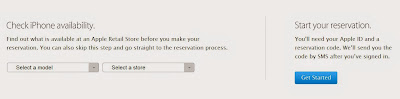
An example of the implementation of monitoring program uses javascript and the Chrome browser and further automation to reserve an iPhone can possibly be completed using Webdriver JS from the Selenium + chrome driver (see
http://youtu.be/I1-m_qcmQLk).
To start with and illustrate, the steps for the javascript code preparation are as below:
(1) Goto the website and open the javascript console (Control-Shift-J in PC, Cmd-Option-J in Mac) in Chrome browser
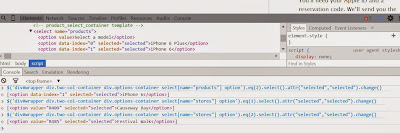
(2) Click the element tab, the dynamic webpage code can be revealed.
- iPhone/availability Select all
<div id="wrapper" class="check-availability">
  <div class="two-col-container">
    <div class="options-container">
      <div class="availability-title-container"> ... </div>
      <div class="storeselect select-style products" style="...">
        <select name="products">
          <option value="">Select a model</option>
          <option data-index="0">iPhone 6 Plus</option>
          <option data-index="1">iPhone 6</option>
        </select>
      </div>
      <div class="storeselect select-style stores" style="...">
        <select name="stores">
          <option value="">Select a store</option>
          <option value="R409">Causeway Bay</option>
          <option value="R485">Festival Walk</option>
          <option value="R428">ifc mall</option>
        </select>
      </div>
(3) Use the CSS style locator (to be entered into the javascript console of Chrome Browser) as below to quickly locate the model selection box and make changes to it, eq(1) being iPhone 6 plus and eq(2) is iPhone 6.
div#wrapper means the div
id locator for the id
wrapper.
div.two-col-container means the div
class locator for the class
two-col-container.
$('div#wrapper div.two-col-container div.options-container select[name="products"] option').eq(1).select().attr("selected","selected").change();

$('div#wrapper div.two-col-container div.options-container select[name="products"] option').eq(2).select().attr("selected","selected").change();
(4) Similarly, the code to select the store is
$('div#wrapper div.two-col-container div.options-container select[name="stores"] option').eq(1).select().attr("selected","selected").change();
(5) To retrieve the dynamic content of the store info, use
$("div#wrapper div.two-col-container div.dropdown-container div.results-container .store").text() + $("div#wrapper div.two-col-container div.dropdown-container div.results-container .date").text();
(6) To retrieve the dynamic content of availability of say 16GB sliver, use
" 16GB " +$("div#wrapper div.two-col-container div.dropdown-container div.results-container .device-sizes tbody tr").eq(0).attr("class") + " " + $("div#wrapper div.two-col-container div.dropdown-container div.results-container .device-sizes tbody tr").eq(0).find(".16GB .isAvailableText").text();
(6.1) Similarly, 16GB gold is
" 16GB " +$("div#wrapper div.two-col-container div.dropdown-container div.results-container .device-sizes tbody tr").eq(1).attr("class") + " " + $("div#wrapper div.two-col-container div.dropdown-container div.results-container .device-sizes tbody tr").eq(1).find(".16GB .isAvailableText").text();
(6.2) For others, just repeat and substitute '16GB' for '
64GB' and '
128GB' and change the eq(0) to eq(
1) and eq(
2) for different colors, 0=silver, 1=gold, 2=space-grey.
(7) To click the
Get Started button on the right of the webpage, use
$('div.skip-wrapper div.button-container .button')[0].click();
To automate the scripts, one possible solution is to use node.js + chromedriver
Download and Put the ChromeDriver (note that it is 32 bit only for Windows/Mac) on your PATH
http://chromedriver.storage.googleapis.com/index.html?path=2.10/
and then install node.js from
http://nodejs.org/download/
and see the WebDriver wiki here https://code.google.com/p/selenium/wiki/WebDriverJs
Note: for windows 8, please create folder in "%HOMEPATH%\AppData\Roaming\
npm"
before installing WebDriver using "npm install selenium-webdriver"
- appleiphone6_availability.js Select all
#!/usr/bin/env node
// for bash shell
// for i in {1..300}; do sleep 1s; ./appleiphone6_availability.js $i; sleep 39s ; done;

// for windows command line, Use two %% if it is in a batch file
// FOR /L %I IN (1,1,300) DO ("C:\Program Files\nodejs\node.exe" appleiphone6_availability.js %I; sleep 39s)

var args = process.argv.slice(2);
var webdriver = require('selenium-webdriver');
var driver = new webdriver.Builder().withCapabilities({
  browserName : 'chrome',
  'chromeOptions': {
    args: ['test-type']
         }
  }).build();
var isDEBUG = false;
var isAvailable = [false,false,false];
var isAvailableCount = 0;
var products = ["","iPhone 6 Plus","iPhone 6"];
var stores = ["","Causeway Bay","Festival Walk","IFC Mall"];
var fs = require('fs');

function nextaction(msg, p) {
  if (isAvailable[p]) {
    return
  }
  else {
    isAvailable[p] = true;
    isAvailableCount++;
    var driver2 = new webdriver.Builder().withCapabilities(webdriver.Capabilities.chrome()).build();

    driver2.wait(function() {
      driver2.get('http://admin:password@192.168.0.1/sms/newmessage.asp')
      if (isAvailableCount > 1) {
        driver2.findElement(webdriver.By.id("maincontent")).findElement(webdriver.By.name("phoneNumber")).sendKeys("12345678");
      }
      else {
        driver2.findElement(webdriver.By.id("maincontent")).findElement(webdriver.By.name("phoneNumber")).sendKeys("12345678;87654321");
      }
 driver2.findElement(webdriver.By.id("maincontent")).findElement(webdriver.By.id("draftContent")).sendKeys("IR Monitoring: " + msg + " now available");
 driver2.findElement(webdriver.By.id("maincontent")).findElement(webdriver.By.id("send")).click();
 return msg != null;
      }, 3000)
    .then(function() {
      driver2.quit();
      var stream = fs.createWriteStream('availableLog.txt', {flags: 'a', encoding : 'unicode'});
      stream.once('open', function(fd) {
      stream.write('SMS sent ' + msg + '\r\n');
      stream.end();

    });
    console.log("SMS sent OK")
    });
  }
  return
}

function check_availability(p,s) {
  driver.get('https://reserve.cdn-apple.com/HK/en_HK/reserve/iPhone/availability');
  driver.executeScript('$("#wrapper .two-col-container .options-container .storeselect select[name=\'products\'] option").eq('+p+').select().attr("selected","selected").change()')
        .then(function() {
          if (isDEBUG) console.log("product selected");
        }, function(err) {
          console.log('There was an error for product selection ! ' + err);
        });

  driver.executeScript('$("#wrapper .two-col-container .options-container .storeselect select[name=\'stores\'] option").eq('+s+').select().attr("selected","selected").change()')
        .then(function() {
          if (isDEBUG) console.log("store selected");
        }, function(err) {
          console.log('There was an error for store selection ! ' + err);
        });
  if (isDEBUG) console.log('CHECKING ' + products[p] + ' ' + stores[s]);
  driver.wait(function() {
    return driver.executeScript('return $("#wrapper .two-col-container .dropdown-container .results-container .store").text() + $("#wrapper .two-col-container .dropdown-container .results-container .date").text()')
      .then(function(message) {
        console.log(args +'  '+message);
        if (message.length < 5) {
          console.log('CHECKING ' + products[p] + ' ' + stores[s]);
          return webdriver.promise.rejected('Please come back later');
        }
        return message != null;
      });
  }, 3000)
  .then(function() {
    driver.wait(function() {
      return driver.executeScript('return $("#wrapper .two-col-container .dropdown-container .results-container .store").text() \
        + $("#wrapper .two-col-container .dropdown-container .results-container .date").text()  \
        + " 16GB " + $("#wrapper .two-col-container .dropdown-container .results-container .device-sizes tbody tr").eq(0).attr("class") + " "  \
        + $("#wrapper .two-col-container .dropdown-container .results-container .device-sizes tbody tr").eq(0).find(".16GB .isAvailableText").text()  \
        + " 16GB " + $("#wrapper .two-col-container .dropdown-container .results-container .device-sizes tbody tr").eq(1).attr("class") + " "  \
        + $("#wrapper .two-col-container .dropdown-container .results-container .device-sizes tbody tr").eq(1).find(".16GB .isAvailableText").text() \
        + " 16GB " + $("#wrapper .two-col-container .dropdown-container .results-container .device-sizes tbody tr").eq(2).attr("class") + " "  \
        + $("#wrapper .two-col-container .dropdown-container .results-container .device-sizes tbody tr").eq(2).find(".16GB .isAvailableText").text() \
        +  " 64GB " + $("#wrapper .two-col-container .dropdown-container .results-container .device-sizes tbody tr").eq(0).attr("class") + " "  \
        + $("#wrapper .two-col-container .dropdown-container .results-container .device-sizes tbody tr").eq(0).find(".64GB .isAvailableText").text() \
        + " 64GB " + $("#wrapper .two-col-container .dropdown-container .results-container .device-sizes tbody tr").eq(1).attr("class") + " "  \
        + $("#wrapper .two-col-container .dropdown-container .results-container .device-sizes tbody tr").eq(1).find(".64GB .isAvailableText").text() \
        + " 64GB " + $("#wrapper .two-col-container .dropdown-container .results-container .device-sizes tbody tr").eq(2).attr("class") + " "  \
        + $("#wrapper .two-col-container .dropdown-container .results-container .device-sizes tbody tr").eq(2).find(".64GB .isAvailableText").text() \
        +  " 128GB " + $("#wrapper .two-col-container .dropdown-container .results-container .device-sizes tbody tr").eq(0).attr("class") + " "  \
        + $("#wrapper .two-col-container .dropdown-container .results-container .device-sizes tbody tr").eq(0).find(".128GB .isAvailableText").text() \
        + " 128GB " + $("#wrapper .two-col-container .dropdown-container .results-container .device-sizes tbody tr").eq(1).attr("class") + " "  \
        + $("#wrapper .two-col-container .dropdown-container .results-container .device-sizes tbody tr").eq(1).find(".128GB .isAvailableText").text() \
        + " 128GB " + $("#wrapper .two-col-container .dropdown-container .results-container .device-sizes tbody tr").eq(2).attr("class") + " "  \
        + $("#wrapper .two-col-container .dropdown-container .results-container .device-sizes tbody tr").eq(2).find(".128GB .isAvailableText").text()'
      ).then(function(message) {
        if (isDEBUG) console.log(message);
        if(message.indexOf(" Available") > -1) {
          console.log(products[p] + ' ' + stores[s] + "Available "+ message);
          var stream = fs.createWriteStream('availableLog.txt', {flags: 'a', encoding : 'unicode'});
          stream.once('open', function(fd) {
            stream.write(args +'  ' + products[p] + ' ' + stores[s] +' Acailable'+ '\r\n' + message + '\r\n');
            stream.end();
          });
          vailableText = products[p] + ' ' + stores[s]+ ' (' ;
          var is16GBAvailable = false;
          var is64GBAvailable = false;
          var is128GBAvailable = false;
          if(message.indexOf("16GB gold Available") > -1) {
            availableText += "16G金";
            is16GBAvailable = true;
          }
          if(message.indexOf("16GB space-grey Available") > -1) {
            if (is16GBAvailable) { availableText += "灰";}
            else {availableText += "16G灰";}
            is16GBAvailable = true;
          }
          if(message.indexOf("16GB silver Available") > -1) {
            if (is16GBAvailable) { availableText += "銀";}
            else { availableText += "16G銀";}
            is16GBAvailable = true;
          }
          if(message.indexOf("64GB gold Available") > -1) {
            availableText += " 64G金";
            is64GBAvailable = true;
          }
          if(message.indexOf("64GB space-grey Available") > -1) {
            if (is64GBAvailable) { availableText += "灰";}
            else { availableText += " 64G灰";}
            is64GBAvailable = true;
          }
          if(message.indexOf("64GB silver Available") > -1) {
            if (is64GBAvailable) { availableText += "銀";}
            else { availableText += " 64G銀";}
            is64GBAvailable = true;
          }
          if(message.indexOf("128GB gold Available") > -1) {
            availableText += " 128G金";
            is128GBAvailable = true;
          }
          if(message.indexOf("128GB space-grey Available") > -1) {
            if (is128GBAvailable) { availableText += "灰";}
            else { availableText += " 128G灰";}
            is128GBAvailable = true;
          }
          if(message.indexOf("128GB silver Available") > -1) {
            if (is128GBAvailable) { availableText += "銀";}
            else { availableText += " 128G銀";}
            is128GBAvailable = true;
          }
          nextaction(availableText+ ')',p);
        }
        return message != null;
      });
    }, 3000)
  }, function(err){
    console.log('There was an error checking ' + products[p] + ' ' + stores[s] + ' ' + err);
  });
}

// node.js has non-blocking I/O and recursive, there is no need to have a loop here

var p1 = 1;
var s1 = 0;
driver.get('https://reserve.cdn-apple.com/HK/en_HK/reserve/iPhone/availability');
driver.wait(function() {
  if (++s1 > 3) {
    s1=1;
    if (++p1 > 2){p1=1}}
    return check_availability(p1,s1);
  }, 180*1000)
  .then(function() {}
  ,function(err){
    driver.quit();
    console.log('check_availability ' + err);
  });


