See here https://github.com/taka-no-me/android-cmake/blob/master/ndk_links.md
and
http://stackoverflow.com/questions/6849981/where-do-i-find-old-versions-of-android-ndk
To extract .bin file under Linux or Mac OSX, chmod +x to make it executable and run for extraction.
Showing posts with label Android NDK. Show all posts
Showing posts with label Android NDK. Show all posts
Sunday, May 1, 2016

Saturday, November 15, 2014
How to compile C++ Game for Andorid NDK using Mac Terminal and Ant
This is a walkthrough of building C++ application with Android ndk and ant without using Eclipse IDE
1. Download the latest Android SDK from http://dl.google.com/android/android-sdk_r23.0.2-macosx.zip
and install Java SDK SE from Oracle say jdk-7u71-macosx-x64.dmg
2. Download Android NDK from say https://dl.google.com/android/ndk/android-ndk-r9d-darwin-x86_64.tar.bz2
3. Install apache ant
Please take note that for Mac OSX Mavericks, ant is no longer in Mac, just download a binary distribution of Ant from http://ant.apache.org/bindownload.cgi . and unzip/untar it, and add its bin directory to PATH.
4. Use Mac Terminal and add path to the above three installation folders
e.g.
5. Use Terminal command android sdk and android avd to update the sdk (install sdk of minimum of API-15 (Android 4.0.x) and create a new avd)
If you use Intel HAX for fast virt mode in emulator, please set Use Host GPU to on.
6. Download some C++ game source code e.g. here http://www.apress.com/9781430258308 . Just download the Source Code from the book website and extract say chapter2.zip
If you want to support multiple platforms add this APP_ABI in HelloDroid/jni/Application.mk
7. ndk-build
list target (assume sdk installed already in step 5 above)
update project with target 1 (assume target id 1 is already created with API-16 in step 5 above)
list avd (assume "NokiaX" is created in step 5 above)
8. start emulator
debug build
install apk to emulator
Note:
(1) use ant uninstall if need to remove
(2) use Control-fn-F12 to rotate the emulator in Mac
(3) the generated apk file is bin/com.beginndkgamecode.hellodroid-debug.apk
(4) add android:icon to AndroidManifest.xml like this to add a default icon.
<application android:icon="@drawable/ic_launcher" android:label="@string/app_name" ...
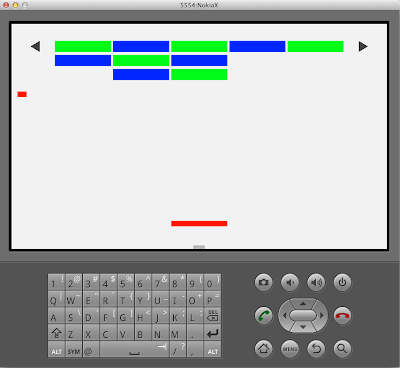
1. Download the latest Android SDK from http://dl.google.com/android/android-sdk_r23.0.2-macosx.zip
and install Java SDK SE from Oracle say jdk-7u71-macosx-x64.dmg
2. Download Android NDK from say https://dl.google.com/android/ndk/android-ndk-r9d-darwin-x86_64.tar.bz2
3. Install apache ant
Please take note that for Mac OSX Mavericks, ant is no longer in Mac, just download a binary distribution of Ant from http://ant.apache.org/bindownload.cgi . and unzip/untar it, and add its bin directory to PATH.
4. Use Mac Terminal and add path to the above three installation folders
e.g.
export PATH=${PATH}:~/android-sdk-macosx/tools:~/android-sdk-macosx/platform-tools:~/android-ndk-r9d:~/apache-ant-1.9.4/bin5. Use Terminal command android sdk and android avd to update the sdk (install sdk of minimum of API-15 (Android 4.0.x) and create a new avd)
If you use Intel HAX for fast virt mode in emulator, please set Use Host GPU to on.
6. Download some C++ game source code e.g. here http://www.apress.com/9781430258308 . Just download the Source Code from the book website and extract say chapter2.zip
If you want to support multiple platforms add this APP_ABI in HelloDroid/jni/Application.mk
APP_PLATFORM := android-16
APP_ABI := armeabi armeabi-v7a x86
7. ndk-build
cd ~/Download/HelloDroid
ndk-build clean && ndk-build
list target (assume sdk installed already in step 5 above)
android list targetupdate project with target 1 (assume target id 1 is already created with API-16 in step 5 above)
android update project -n com.beginndkgamecode.hellodroid -t 1 -p .list avd (assume "NokiaX" is created in step 5 above)
android list avd8. start emulator
emulator -avd NokiaX -scale 0.5 &debug build
ant clean && ant debuginstall apk to emulator
ant debug installNote:
(1) use ant uninstall if need to remove
(2) use Control-fn-F12 to rotate the emulator in Mac
(3) the generated apk file is bin/com.beginndkgamecode.hellodroid-debug.apk
(4) add android:icon to AndroidManifest.xml like this to add a default icon.
<application android:icon="@drawable/ic_launcher" android:label="@string/app_name" ...

Tuesday, June 19, 2012
androideabi Utilities Binaries
These are the utilities for Android Terminal Access
Download here
http://apiexplorer.googlecode.com/files/androideabi_binary.zip
bash 4.1 (requires root)
make (useful for GCC Plugin for C4droid)
python (standalone script requires PythonForAndroid_r4.apk)
perl (standalone script requires perl_for_android_r1.apk)
vim (with multibyte support)
wget (in case your busybox's wget was broken with bad address)
curl (how I build this ? -> here)
utelnetd (telnet daemon, utelnetd -p 1025 -l /system/bin/bash &)
scp
ssh
rsync
Instructions:
root the device and push these utilities to /system/bin/ or /system/xbin and chmod 04755 or chmod 755, if your /system folder is readonly, you might need Root Explorer to mount it as RW.
vim with multibyte support
Before the use of vim, you should setup TERM as
And for editing UTF-8 File, use
Download here
http://apiexplorer.googlecode.com/files/androideabi_binary.zip
bash 4.1 (requires root)
make (useful for GCC Plugin for C4droid)
python (standalone script requires PythonForAndroid_r4.apk)
perl (standalone script requires perl_for_android_r1.apk)
vim (with multibyte support)
wget (in case your busybox's wget was broken with bad address)
curl (how I build this ? -> here)
utelnetd (telnet daemon, utelnetd -p 1025 -l /system/bin/bash &)
scp
ssh
rsync
Instructions:
root the device and push these utilities to /system/bin/ or /system/xbin and chmod 04755 or chmod 755, if your /system folder is readonly, you might need Root Explorer to mount it as RW.
adb push bash /system/bin/bash

adb shell "chmod 04755 /system/bin/bash"
su -c /system/bin/bashvim with multibyte support
Before the use of vim, you should setup TERM as
export TERM=xtermAnd for editing UTF-8 File, use
vim --cmd "set encoding=utf-8" myfile.txtSunday, August 14, 2011
How to build Android ndk sample using ant
This is a walkthrough of how to build the hello-jni sample from Android ndk after you have installed sdk and ndk. You want to use ant instead of Eclipse for building sample project.
Suppose your install paths of sdk and ndk are
Setup PATH
Please take note that for Mac OSX Mavericks, ant is no longer in Mac, just download a binary distribution of Ant from http://ant.apache.org/bindownload.cgi . Just download it, unzip/untar it, and add its bin directory to your PATH. say export PATH=${PATH}:~/apache-ant-1.9.4/bin
ndk-build
list target (assume sdk installed)
update project with target 1
list avd (suppose AVD4G created during sdk installation)
start emulator
debug build
install to emulator
use ant uninstall to remove
If you want to code-sign the binary, first create the build.properties and self-signing certificate and compile release
create build.properties
create self-signing certificate and compile release
This is how to compile C++ program with stlport in ndk
modify jni/test-libstl.cpp to
create jni/Application.mk with
modify jni/Android.mk with
run with emulator
For Windows, add this PATH in environment (path should not have spaces)
C:\Android\android-sdk\tools;C:\Android\apache-ant-1.8.2\bin;C:\Android\android-ndk-r6;
JAVA_HOME=C:\Program Files\Java\jdk1.6.0_29
and you need cygwin to start ndk-build
.
.
.
Suppose your install paths of sdk and ndk are
~/android-sdk-mac_x86 and ~/android-ndk-r5cSetup PATH
export PATH=${PATH}:~/android-sdk-mac_x86/tools:~/android-ndk-r5cPlease take note that for Mac OSX Mavericks, ant is no longer in Mac, just download a binary distribution of Ant from http://ant.apache.org/bindownload.cgi . Just download it, unzip/untar it, and add its bin directory to your PATH. say export PATH=${PATH}:~/apache-ant-1.9.4/bin
ndk-build
cd ~/android-ndk-r5c/samples/hello-jni
ndk-build
list target (assume sdk installed)
android list targetupdate project with target 1
android update project -t 1 -p .list avd (suppose AVD4G created during sdk installation)
android list avdstart emulator
emulator -avd AVD4G -scale 0.5 &

#if you have Samsung Galaxy skin (download here)
emulator -avd AVD4G -skin GALAXY_Tab -scale 0.5 &
debug build
ant debuginstall to emulator
ant debug installuse ant uninstall to remove
If you want to code-sign the binary, first create the build.properties and self-signing certificate and compile release
create build.properties
# location of the keystore. This is used by ant release
key.store= /my-path-to-mykey/my.keystore
key.alias=mykeystore
create self-signing certificate and compile release
keytool -genkey -v -keystore /my-path-to-mykey/my.keystore -alias mykeystore -keyalg RSA -keysize 2048 -validity 10000
ant release
This is how to compile C++ program with stlport in ndk
cd ~/android-ndk-r5c/samples/test-libstdc++modify jni/test-libstl.cpp to
- jni/test-libstl.cpp Select all
#include <iostream>
using namespace std;

int main() {
  cout << "hello, world\n";
  return 0;
}
create jni/Application.mk with
APP_STL := stlport_static
modify jni/Android.mk with
- jni/Android.mk Select all
LOCAL_PATH := $(call my-dir)

include $(CLEAR_VARS)
LOCAL_MODULE := test-libstl
LOCAL_SRC_FILES := test-libstl.cpp
LOCAL_LDLIBS    := -llog

include $(BUILD_EXECUTABLE)

include $(CLEAR_VARS)
LOCAL_EXECUTABLE := test-libstl

run:
    ~/android-sdk-mac_x86/platform-tools/adb push libs/armeabi/$(LOCAL_MODULE) /data/local/bin/$(LOCAL_MODULE)
    ~/android-sdk-mac_x86/platform-tools/adb shell chmod 755 /data/local/bin/$(LOCAL_MODULE)
    ~/android-sdk-mac_x86/platform-tools/adb shell /data/local/bin/$(LOCAL_MODULE)

# makefile requires the use of tab for the indented spaces above
run with emulator
cd ~/android-ndk-r5c/samples/test-libstdc++
ndk-build clean && ndk-build
ndk-build run
For Windows, add this PATH in environment (path should not have spaces)
C:\Android\android-sdk\tools;C:\Android\apache-ant-1.8.2\bin;C:\Android\android-ndk-r6;
JAVA_HOME=C:\Program Files\Java\jdk1.6.0_29
and you need cygwin to start ndk-build
.
.
.
Thursday, October 29, 2009
Android NDK Makefile
(1) install NDK 1.6 in say
~/Android/android-ndk-1.6_r1
download http://developer.android.com/sdk/ndk/1.6_r1/index.html
(2) install SDK 1.6 in say
~/Android/android-sdk-linux_x86-1.6_r1
download http://developer.android.com/sdk/1.6_r1/index.html
(3) you can compile standalone C program like this hello.c using the Makefile below
(4) Create Makefile
(5) connect device and test using
(6) compile C++ program example1.cpp (no STL)
~/Android/android-ndk-1.6_r1
download http://developer.android.com/sdk/ndk/1.6_r1/index.html
(2) install SDK 1.6 in say
~/Android/android-sdk-linux_x86-1.6_r1
download http://developer.android.com/sdk/1.6_r1/index.html
(3) you can compile standalone C program like this hello.c using the Makefile below
#include <stdio.h>
int main() {
  printf("hello, NDK makefile world\n");
  return 0;
}
(4) Create Makefile
- Makefile Select all
APP=hello

NDK_DIR := /cygdrive/c/Android/android-ndk-1.6_r1
#NDK_DIR := ~/Android/android-ndk-1.6_r1
NDK_HOST := windows
#NDK_HOST := linux-x86
#NDK_HOST := darwin-x86
SDKTOOL := /cygdrive/c/Android/android-sdk-windows-1.6_r1/tools
#SDKTOOL := ~/Android/android-sdk-linux_x86-1.6_r1/tools
#SDKTOOL := ~/Android/android-sdk-mac_x86-1.6_r1/tools

TOOLCHAIN_PREFIX := $(NDK_DIR)/build/prebuilt/$(NDK_HOST)/arm-eabi-4.2.1/bin/arm-eabi-
CC := $(TOOLCHAIN_PREFIX)gcc
CPP := $(TOOLCHAIN_PREFIX)g++
LD := $(CC)

COMMON_FLAGS := -mandroid -ffunction-sections -fdata-sections -Os -g 	--sysroot=$(NDK_DIR)/build/platforms/android-4/arch-arm \
	-fPIC \
	-fvisibility=hidden \
	-D__NEW__

CFLAGS := $(COMMON_FLAGS)

CFLAGS += -D__ARM_ARCH_5__ -D__ARM_ARCH_5T__ -D__ARM_ARCH_5E__ -D__ARM_ARCH_5TE__ -DANDROID -DSK_RELEASE -DNDEBUG

CFLAGS += -UDEBUG -march=armv5te -mtune=xscale -msoft-float -mthumb-interwork -fpic -ffunction-sections -funwind-tables -fstack-protector -fmessage-length=0 -Bdynamic


CPPFLAGS := $(COMMON_FLAGS) \
	-fno-rtti -fno-exceptions \
	-fvisibility-inlines-hidden

LDFLAGS += --sysroot=$(NDK_DIR)/build/platforms/android-4/arch-arm
LDFLAGS +=  -Bdynamic -Wl,-dynamic-linker,/system/bin/linker -Wl,--gc-sections -Wl,-z,nocopyreloc
LDFLAGS += -L$(NDK_DIR)/build/prebuilt/$(NDK_HOST)/arm-eabi-4.2.1/lib/gcc/arm-eabi/4.2.1/android
LDFLAGS += -L$(NDK_DIR)/build/prebuilt/$(NDK_HOST)/arm-eabi-4.2.1/lib/gcc/arm-eabi/4.2.1
LDFLAGS += -L$(NDK_DIR)/build/prebuilt/$(NDK_HOST)/arm-eabi-4.2.1/lib/gcc
LDFLAGS += -L$(NDK_DIR)/build/prebuilt/$(NDK_HOST)/arm-eabi-4.2.1/arm-eabi/lib
LDFLAGS += -nostdlib -lc -llog -lgcc \
	--no-undefined -z $(NDK_DIR)/build/platforms/android-4/arch-arm/usr/lib/crtbegin_dynamic.o $(NDK_DIR)/build/platforms/android-4/arch-arm/usr/lib/crtend_android.o

OBJS += $(APP).o

all:	$(APP)

$(APP):	$(OBJS)
	$(LD) $(LDFLAGS) -o $@ $^

%.o:	%.c
	$(CC) -c $(CFLAGS) $< -o $@

%.o:	%.cpp
	$(CPP) -c $(CFLAGS) $(CPPFLAGS) $< -o $@

install:	$(APP)
	$(SDKTOOL)/adb push $(APP) /data/local/bin/$(APP)
	$(SDKTOOL)/adb shell chmod 755 /data/local/bin/$(APP)

run:
	$(SDKTOOL)/adb shell /data/local/bin/$(APP)

clean:
	@rm -f $(APP).o $(APP)
(5) connect device and test using
make all
make install run
(6) compile C++ program example1.cpp (no STL)
make APP=example1 all install run
- example1.cpp Select all
#include <stdio.h>

class counter {
public:
	int some_data;
	char some_other_data[100];
	int i;

	void increment_counter() {i++;}
	void decrement_counter() {i--;}
	int query_counter() {return i;}

	void set_counter(int new_value);
};

void counter::set_counter(int new_value)
{
	i = new_value;
}

main()
{
	counter apples;
	counter oranges;
	counter *pointer_to_counter = NULL;
	counter array_of_counters[10];
	int x = 5;

	apples.some_data = x;

	apples.set_counter(10);
	apples.increment_counter();
	apples.increment_counter();

	oranges.set_counter(5);
	oranges.decrement_counter();

	printf("%d apples and %d oranges\n",
	apples.query_counter(),
	oranges.query_counter());
}
Saturday, October 24, 2009
Android NDK add stlport and compile C++ program
(1) Assume you have Android ndk 1.6 and your ndk directory is in ~/Android/android-ndk-1.6_r1 and you are using mac
download ndk-wrapper from
reference
http://umbel.mooo.com/git?p=ndk-wrappers.git;a=summary
(2) Edit ~/Android/ndk-wrappers/setup.sh and add these
(3) Edit ~/Android/ndk-wrappers/scripts/build-stlport.sh ad add these
(4) Edit ~/Android/ndk-wrappers/scripts/env-utils.sh and change / add these
For linux
HOST=linux-x86
For CYGWIN
HOST=windows
(5) Change ~/Android/ndk-wrappers/stlport/build/lib/android.mak
from
to
(6) Add link
(7) For Mac only, upgrade sed using Mac port
(8) build stlport
(9) Create hello.cpp to test
(10) Compile
(11) Sent to device for testing
You can use Makefile
download ndk-wrapper from
cd ~/Android
git clone git://umbel.mooo.com/ndk-wrappers.git
reference
http://umbel.mooo.com/git?p=ndk-wrappers.git;a=summary
(2) Edit ~/Android/ndk-wrappers/setup.sh and add these
export HOST=darwin-x86
export NDK_DIR=~/Android/android-ndk-1.6_r1
export NDK_WRAPPERS_BASE=~/Android/ndk-wrappers
(3) Edit ~/Android/ndk-wrappers/scripts/build-stlport.sh ad add these
export NDK_WRAPPERS_BASE=~/Android/ndk-wrappers
export PATH=~/Android/ndk-wrappers/bin:$PATH
(4) Edit ~/Android/ndk-wrappers/scripts/env-utils.sh and change / add these
SYSROOT="${NDK_DIR}/build/platforms/android-4/arch-arm"
HOST=darwin-x86
For linux
HOST=linux-x86
For CYGWIN
HOST=windows
(5) Change ~/Android/ndk-wrappers/stlport/build/lib/android.mak
from
--sysroot=$(NDK_DIR)/build/platforms/android-1.5/arch-arm \
to
--sysroot=$(NDK_DIR)/build/platforms/android-4/arch-arm \
(6) Add link
cd ~/Android/ndk-wrappers/stlport/build/Makefiles/gmake
ln -s linux arm-linux
(7) For Mac only, upgrade sed using Mac port
sudo port install gsed
sudo ln -s /opt/local/bin/gsed /opt/local/bin/sed
(8) build stlport
cd ~/Android/ndk-wrappers
export NDK_DIR=~/Android/android-ndk-1.6_r1
./setup.sh
(9) Create hello.cpp to test
#include <iostream>
using namespace std;
int main() {
  cout << "hello, world\n";
  return 0;
}
(10) Compile
~/Android/ndk-wrappers/bin/arm-linux-g++ -o hello hello.cpp -L~/Android/ndk-wrappers/stlport/build/lib/obj/arm-linux-gcc/so
(11) Sent to device for testing
adb push hello /data/local/bin/hello
adb shell chmod 755 /data/local/bin/hello
adb shell /data/local/bin/hello
You can use Makefile
- Makefile Select all
APP := hello
SDKTOOL := ~/Android/android-sdk-mac_x86-1.6_r1/tools
WRAPPER := ~/Android/ndk-wrappers
STLLIB := -L~/Android/ndk-wrappers/stlport/build/lib/obj/arm-linux-gcc/so
BIN := $(WRAPPER)/bin
CPP := $(BIN)/arm-linux-g++
CC := $(BIN)/arm-linux-gcc

all: $(APP)

OBJS += $(APP).o

$(APP): $(OBJS)
 $(CPP) $(LDFLAGS) -o $@ $(STLLIB) $^

%.o: %.c
 $(CC) -c $(INCLUDE) $(CFLAGS) $< -o $@

%.o: %.cpp
 $(CPP) -c $(INCLUDE) $(CFLAGS) $(CPPFLAGS) $< -o $@

install: $(APP)
 $(SDKTOOL)/adb push $(APP) /data/local/bin/$(APP)
 $(SDKTOOL)/adb shell chmod 755 /data/local/bin/$(APP)

shell:
 $(SDKTOOL)/adb shell

run:
 $(SDKTOOL)/adb shell /data/local/bin/$(APP)

clean:
 @rm -f $(APP).o $(APP)
Subscribe to:
Posts (Atom)


