This is needed after you have installed Mac Office 2008 SP1
Remove and reenter the Mac Office 2008 product key
If your copy of Office 2008 was installed with an invalid product key, or if you mistakenly used the same product key to install Office 2008 on more than one computer, you must remove the invalid product key and enter a valid product key to use Office 2008.
(1) In the Finder, select /Applications/Microsoft Office 2008/Office/OfficePID.plist
, and then on the File menu, click Move to Trash.
(2) Select /Users/yourusername/Library/Preferences/Microsoft/Office 2008/Microsoft Office 2008 settings.plist
, and then on the File menu, click Move to Trash.
(3) On the Apple menu, click Restart.
(4) After your computer restarts, open any Office 2008 application.
(5) The Office Setup Assistant opens.
(6) Accept the software license agreement, and then enter your valid product key.
Friday, May 30, 2008

Sunday, May 25, 2008
Mac OS X Leopard runs IE6 (Active X) natively
You don't need VMWare, bootcamp nor Parellel Desktop. And it is free. You can run IE6 with Active X support in Mac OS X under X11
see this instruction
http://www.kronenberg.org/ies4osx/
If you need to install additional fonts, put them here
Internet Explorer 6.0.app/Contents/Resources/ie6/drive_c/windows/Fonts
I use these commands to install Chinese Font inside

see this instruction
http://www.kronenberg.org/ies4osx/
If you need to install additional fonts, put them here
Internet Explorer 6.0.app/Contents/Resources/ie6/drive_c/windows/Fonts
I use these commands to install Chinese Font inside
cd Desktop/Internet Explorer 6.0.app/Contents/Resources/ie6/drive_c/windows/Fonts
ln -s /System/Library/Fonts/儷黑\ Pro.ttf .

Saturday, May 24, 2008
iPhone Open Toolchain Header runs UIShowCase
The missing UIKit clasees of open toolchain headers for IPhone SDK is now partially solved. You can now build UIShowCase in your Open Toolchain Template in iPhone SDK.
Read this
http://www.hackint0sh.org/forum/showpost.php?p=297245&postcount=15

Read this
http://www.hackint0sh.org/forum/showpost.php?p=297245&postcount=15

Wednesday, May 14, 2008
What is needed to be an iPhone programmer (firmware 2.0 OS)
Even if you are not a registered iPhone developer of Apple (US$99 program), you still can code and test your iPhone program in firmware 2.0
This is how:
(1) You need a machine running Mac OS X 10.5.2 with Intel CPU because you need to run iPhone SDK for the iPhone OS 2.0
there are several possibilities, e.g.
(a) you can get a Intel Mac with Mac OS X 10.5.2 (which I think is the easiest one and save a lot of troubles, thus you can put omore time in the learning of iPhone programming)
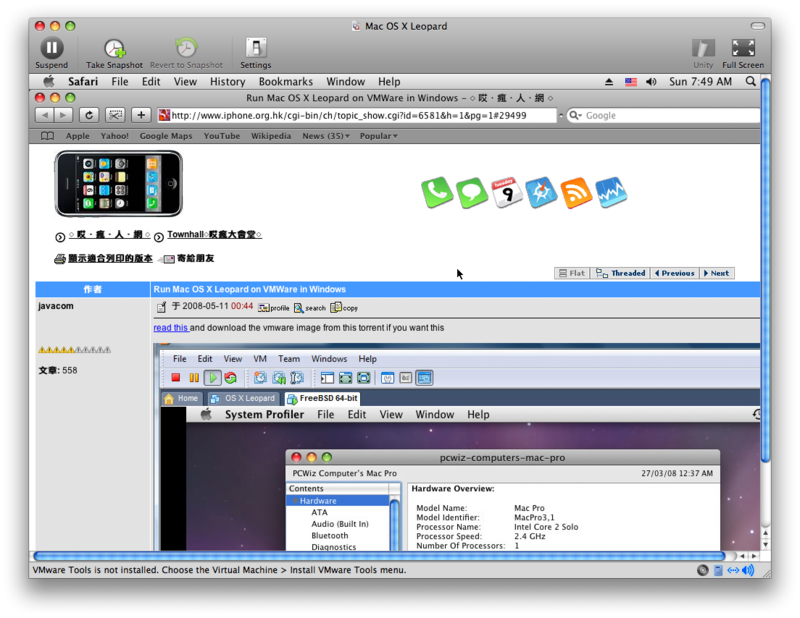
(b) Use the VMWare image (and use VMWare Workstation/Player for PC), read this, and install iPhone SDK in it. You need C2D Intel CPU and lots of RAM (2G) in your existing PC.
(c) Install OSX86 on PC (you must be a power user), read this forum on how http://www.hackint0sh.org/forum/forumdisplay.php?f=104
(2) Get the iPhone SDK from Apple which is free after registration with Apple.
(3) You need to read some books on Objective C and Foundation framework of Mac OS X, I think Oreilly has good source of books in this subject. This site also gives some tutorial exmaples on cocoa programming http://cocoadevcentral.com/
(4) Get a pwned iPhone with iPhone OS 2.0 firmware beta 3 (build 5A240d)
read this for the pwnage tools http://www.hackint0sh.org/forum/forumdisplay.php?f=146
(5) Read this Forum and use the Xcode template (open toolchain header) here to start some coding and testing on iPhone
http://www.hackint0sh.org/forum/showthread.php?t=38389
(6) get some project code (based on open toolchain) from the right menu of this blog to compile and test run on iPhone
(7) start coding your own idea in your own iPhone project.
This is how:
(1) You need a machine running Mac OS X 10.5.2 with Intel CPU because you need to run iPhone SDK for the iPhone OS 2.0
there are several possibilities, e.g.
(a) you can get a Intel Mac with Mac OS X 10.5.2 (which I think is the easiest one and save a lot of troubles, thus you can put omore time in the learning of iPhone programming)
(b) Use the VMWare image (and use VMWare Workstation/Player for PC), read this, and install iPhone SDK in it. You need C2D Intel CPU and lots of RAM (2G) in your existing PC.
(c) Install OSX86 on PC (you must be a power user), read this forum on how http://www.hackint0sh.org/forum/forumdisplay.php?f=104
(2) Get the iPhone SDK from Apple which is free after registration with Apple.
(3) You need to read some books on Objective C and Foundation framework of Mac OS X, I think Oreilly has good source of books in this subject. This site also gives some tutorial exmaples on cocoa programming http://cocoadevcentral.com/
(4) Get a pwned iPhone with iPhone OS 2.0 firmware beta 3 (build 5A240d)
read this for the pwnage tools http://www.hackint0sh.org/forum/forumdisplay.php?f=146
(5) Read this Forum and use the Xcode template (open toolchain header) here to start some coding and testing on iPhone
http://www.hackint0sh.org/forum/showthread.php?t=38389
(6) get some project code (based on open toolchain) from the right menu of this blog to compile and test run on iPhone
(7) start coding your own idea in your own iPhone project.
Sunday, May 11, 2008

Saturday, May 10, 2008

class-dump for iPhone SDK header file
http://iphone.freecoder.org/classdump_en.html
with this wonderful tool, you don't need to worry about header files problem any more
e.g.
put the class-dump binary (Mac OS X) in your bin and do this
you will get the most updated header files in your current directory from the SDK
with this wonderful tool, you don't need to worry about header files problem any more
e.g.
put the class-dump binary (Mac OS X) in your bin and do this
class-dump -H /Developer/Platforms/iPhoneSimulator.platform/Developer/SDKs/iPhoneSimulator2.0.sdk/System/Library/Frameworks/UIKit.framework/UIKit
you will get the most updated header files in your current directory from the SDK
Subscribe to:
Comments (Atom)


