Here are the shortcut keys that I discovered for the Bluetooth keyboard when using iPad
Command Z : Undo
Command Shift Z : Redo
Command A : Select All
Command X : Cut
Command C : Copy
Command V : Paste
Command Space : keyboard selection (if you have enabled multiple keyboards in iPad)
Command-delete : Delete to beginning of line
Control H : Delete
Control I : Tab
Control K : delete to end of line
Shift Arrow : Make Selection range
Option Arrow : advance / backward word
Command Arrow : Start / End of line or Top / Bottom
Eject button on the top right : hide /unhide soft keyboard for iPad (when in editing mode)
All the Brightness, playback and sound control function keys are working
Sunday, May 2, 2010

Saturday, May 1, 2010
Snow Leopard Screenshots and Grab not working
Recently, I have upgraded from 10.5.x to to 10.6.2 and then 10.6.3 and the Screenshots (Cmd Shit 3 / Cmd Shift 4) and Grab app are not function properly. That is no images are generated.
The solution is to reinstall the
Mac OS X 10.6.2 Update (Combo)
http://support.apple.com/downloads/DL959/en_US/MacOSXUpdCombo10.6.2.dmg
or
Mac OS X 10.6.3 Update (Combo)
http://support.apple.com/downloads/DL1017/en_US/MacOSXUpdCombo10.6.3v1.1.dmg
Then these problems will be fixed.
.
.
.
The solution is to reinstall the
Mac OS X 10.6.2 Update (Combo)
http://support.apple.com/downloads/DL959/en_US/MacOSXUpdCombo10.6.2.dmg
or
Mac OS X 10.6.3 Update (Combo)
http://support.apple.com/downloads/DL1017/en_US/MacOSXUpdCombo10.6.3v1.1.dmg
Then these problems will be fixed.
.
.
.
Sunday, April 11, 2010
iPhone OS 4.0 beta 1 vfdecrypt key
4.0 beta 1 (8A230m)
Root Filesystem
iPhone 3G
0da2d3316d5ee7cd1858e4035e451387cd8156e97535fb09028859e68e5b7b39a6649552
iPhone 3GS
4fea9105d8445961cbeef29f06d93685af4b7f45a02eaf7f7cdc8f78784762df3f1072c7
iPod Touch 3G
382dee11b9d80387b16ac2030ee1e903b78d9743a31a18bcafc922b7921eca85ab0aebf7
iPod Touch 2G
d88fa434f6a8c50fd49cd0923879da5c3079c59c0e534cff521a9cecbcad48d84b4daef0
4.0 beta 2 (8A248c)
Root Filesystem
iPhone 3G
0da2d3316d5ee7cd1858e4035e451387cd8156e97535fb0902 8859e68e5b7b39a6649552
iPhone 3GS
62ea9bf9971e6c410231646f916f80330f9cbc1d1c585f0c03 dab6b6f7158dc0a9c5efaf
iPod Touch 3G
382dee11b9d80387b16ac2030ee1e903b78d9743a31a18bcaf c922b7921eca85ab0aebf7
iPod Touch 2G
d88fa434f6a8c50fd49cd0923879da5c3079c59c0e534cff52 1a9cecbcad48d84b4daef0
Root Filesystem
iPhone 3G
0da2d3316d5ee7cd1858e4035e451387cd8156e97535fb09028859e68e5b7b39a6649552
iPhone 3GS
4fea9105d8445961cbeef29f06d93685af4b7f45a02eaf7f7cdc8f78784762df3f1072c7
iPod Touch 3G
382dee11b9d80387b16ac2030ee1e903b78d9743a31a18bcafc922b7921eca85ab0aebf7
iPod Touch 2G
d88fa434f6a8c50fd49cd0923879da5c3079c59c0e534cff521a9cecbcad48d84b4daef0
4.0 beta 2 (8A248c)
Root Filesystem
iPhone 3G
0da2d3316d5ee7cd1858e4035e451387cd8156e97535fb0902 8859e68e5b7b39a6649552
iPhone 3GS
62ea9bf9971e6c410231646f916f80330f9cbc1d1c585f0c03 dab6b6f7158dc0a9c5efaf
iPod Touch 3G
382dee11b9d80387b16ac2030ee1e903b78d9743a31a18bcaf c922b7921eca85ab0aebf7
iPod Touch 2G
d88fa434f6a8c50fd49cd0923879da5c3079c59c0e534cff52 1a9cecbcad48d84b4daef0
Saturday, April 10, 2010
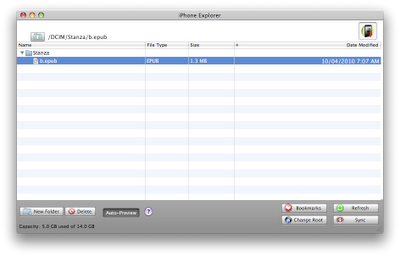
Stanza 2.1 USB transfer epub file (no jailbreak required)
Download iPhone Explorer (Windows or Mac version)
http://www.iphone-explorer.com/
Choose /var/mobile/Media as root directory and create Stanza folder under DCIM directory
upload epub file to say
DCIM/Stanza/b.epub
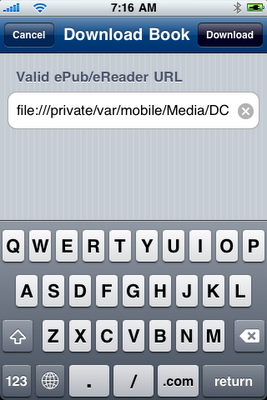
1) Launch Stanza on your iPhone, and go to the "Get Books" tab.
2) Select the "Downloads" segment.
3) Tap the plus sign.
4) enter URL
file:///private/var/mobile/Media/DCIM/Stanza/b.epub
Then press Download button
http://www.iphone-explorer.com/
Choose /var/mobile/Media as root directory and create Stanza folder under DCIM directory
upload epub file to say
DCIM/Stanza/b.epub

1) Launch Stanza on your iPhone, and go to the "Get Books" tab.
2) Select the "Downloads" segment.
3) Tap the plus sign.
4) enter URL
file:///private/var/mobile/Media/DCIM/Stanza/b.epub
Then press Download button

Wednesday, March 31, 2010
Old versions of iTunes
Windows iTunes version 9.0.3
http://appldnld.apple.com.edgesuite.net/content.info.apple.com/iTunes9/061-7753.20100201.Jcv4r/iTunesSetup.exe
Windows iTunes version 8.2.1
http://appldnld.apple.com.edgesuite.net/content.info.apple.com/iTunes8/061-6717.20090715.XsE4R/iTunesSetup.exe
Mac iTunes version 9.0.3
http://appldnld.apple.com.edgesuite.net/content.info.apple.com/iTunes9/061-7752.20100201.Tz39N/iTunes9.0.3.dmg
Mac iTunes version 8.2.1
http://appldnld.apple.com.edgesuite.net/content.info.apple.com/iTunes8/061-6715.20090715.cfR54/iTunes8.2.1.dmg
Wednesday, February 24, 2010

Thursday, January 7, 2010
香港人支付寶增值方法
虛擬商品 / 小數目的話
(1) 香港買張中移動神州行手機充值卡 (序列號/卡號為17位,充值密碼為18位的全國通用充值卡)
(2) 支付寶內選擇[消费卡]充值及[话费充值卡]
(3) 選擇[充值卡面值]50元/100元 及填入 [充值卡号] (序列號/Serial Number) 及 [充值卡密码]
充值卡面值100元扣除服务费:5.00 元(费率:5%)

大數目的話
淘寶通過「支付寶」平台完成支付,
他們近年努力開拓香港業務。
目前支持香港、台灣、澳門地區通過Visa 3D驗證的Visa信用卡。
香港的部分,包括以下銀行:
BOCI(中銀香港)
Hang Seng(恆生銀行)
HSBC(香港匯豐銀行)
BEA(東亞銀行)
SCB(渣打銀行)
DBS(星展銀行)
ICBC(中國工商銀行亞洲)
服務費用及限額:
從2009年7月7日開始, 支付寶將收取3%的服務費(如發生退款,服務費按相同比例退還,但您需要承擔可能的資金損益,例如匯率波動、銀行收費等)。此服務費與VISA卡組織所確定的附加費用無關,是支付寶對用戶使用支付寶系統進行交易所收取的系統使用服務費。
溫馨提醒:
以下5種情況下不可以使用VISA付款:
1)淘寶以外的交易是不能使用外卡的
2)如運費是由賣家負責,請聯繫賣家在購買前把運費更改為“買家負責” 。
3)如使用了“合併付款”功能,visa暫時是不支持“合併付款” 。
4)虛擬商品是不能用VISA付款。
5)交易金額小於1元人民幣是不能使用外卡的。
.
.
.
Subscribe to:
Posts (Atom)


